
Are you looking for the best Image note taking apps? When taking notes, it is essential to maintain concentration, engage in conversation, and remember information that might otherwise be forgotten. Whenever one of us has an idea or hears one, our first inclination is to search for a scrap of paper to scribble it down.
Nevertheless, the circumstances are shifting. The amount of information available to people nowadays is overwhelming. Utilizing image note taking software to create and organize one’s notes and manage those notes is an incredible experience.
The following is a list of the finest image note taking app and tools that can assist you in safely storing all of your significant ideas, thoughts, and information in a single location and can access at any time and from any site.

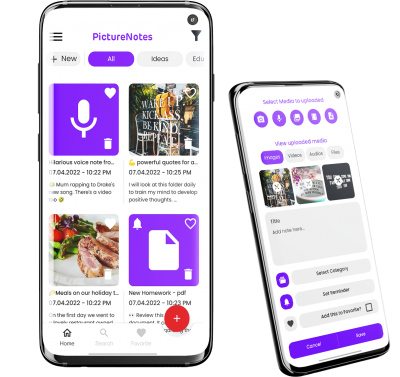
Picture Notes is a new rapidly growing personal note taking app focused around organising your gallery. It is hosted in the cloud and is ideal for the creation of notes containing imagery as well as taking memos.
You can rapidly format your notes in Picture Notes’ editor, which features a streamlined and uncluttered design, by adding headings, detailed descriptions, reminders, numbered lists, and other elements.
You can enhance the visual quality of your notes by inserting photographs, PDF’s, videos, music, and many different file types.
Dropbox Paper
Dropbox Paper is an online document workspace that allows you to organize and see your files and media and display text in a centralized spot. Users can effortlessly interact with one another, and they may view your documents from any location.
You may insert pictures, PDFs, movies, audio files, spreadsheets, and more than 175 other files straight into your documents by dragging and dropping them.
OneNote saves text and photos in free-form documents, much like other note taking applications such as Picture Notes and Dropbox Paper. You can share these documents with others or keep them private.
Tools such as Word, PowerPoint, and Excel are all included in the Microsoft Office Suite, and OneNote is one of those programs.
Google Keep is a free mobile app that may be used for note taking. Make sure you remember everything by saving your notes, lists, images, and audio and setting reminders based on location and time so you can reflect on them afterward.
Taking notes is one of the most general requirements for both individuals and groups of people working together. There are dozens, if not hundreds, of additional applications for taking notes that can be downloaded from the app store nowadays.
Which note taking app will you download? That is the burning question of the hour. The applications that we have featured in this post are considered to be the most excellent note taking apps. Examine each of these applications in depth to comprehend better which tools will serve you and your teams effectively.

Start by trying Picture Note for free
